Overdrop - Weather & Widgets
- 4.2
- Rating
- 1.00M
- Installs
- Free
- Price
 Analysis by App-foxy
I judge weather apps by one practical question: do they help me make a decision before I leave home? Overdrop takes that question seriously by putting forecasts, radar information, and weather details into a highly customizable home-screen experience. Instead of opening an app every time I want to know whether rain is approaching, I can arrange the information I care about where I will actually see it.
That makes this free weather app from overdrop.app more interesting than a simple forecast reader. Its main appeal is not merely displaying today’s temperature. It is the way the forecast can become part of my phone’s daily layout through a large collection of widgets, alongside live radar and a visual design that feels more deliberate than the default weather tools found on many phones.
After spending time with it, I see Overdrop as a strong choice for people who want weather information available at a glance and enjoy adjusting the look of their device. It is less compelling for someone who only checks the temperature once in the morning and wants the smallest possible app with no customization decisions.
You May Also Like

 Blood Strike: 2.5 Anniversary
Blood Strike’s Loadouts Turn Every Drop Into a Tactical Gamble
A close look at Blood Strike’s custom loadouts: how fast access to signature weapons reshapes its battle royale rhythm, rewards preparation, and narrows the gap between fights.

 Pandora - Music & Podcasts
Pandora’s Music Is Easy to Start, but Harder to Recover
Pandora’s strength is its low-effort path from a seed to a station. Its weak spot is how much confidence it asks you to place in connection, setup, and quiet recovery.

 8 Ball Pool
 Is Built on Rivalries, Rematches, and Routine
A close look at the rivalries, rematches, shared routines, and unanswered safety questions that turn a quick pool match into a persistent mobile community.

 Samsung Music
’s Quiet Strength Is Playing What You Already Own
Its reach comes less from spectacle than from dependable access to a personal library. That simplicity is both the app’s strongest retention engine and its ceiling.

 AccuWeather: Weather Radar
AccuWeather Review: A Quick, Clear Forecast for Everyday Decisions
For everyday plans, the best forecast is the one you can understand quickly. AccuWeather makes rain timing, radar, and local conditions easy to act on, with a few trade-offs.

 Hill Climb Racing
Why Hill Climb Racing Still Turns Crashes Into One More Run
A tiny car, a bumpy hill and one more upgrade: Hill Climb Racing keeps resurfacing because its simple chaos makes every near-miss feel personal.
More From Our News Desk



Making the forecast useful before I open the app
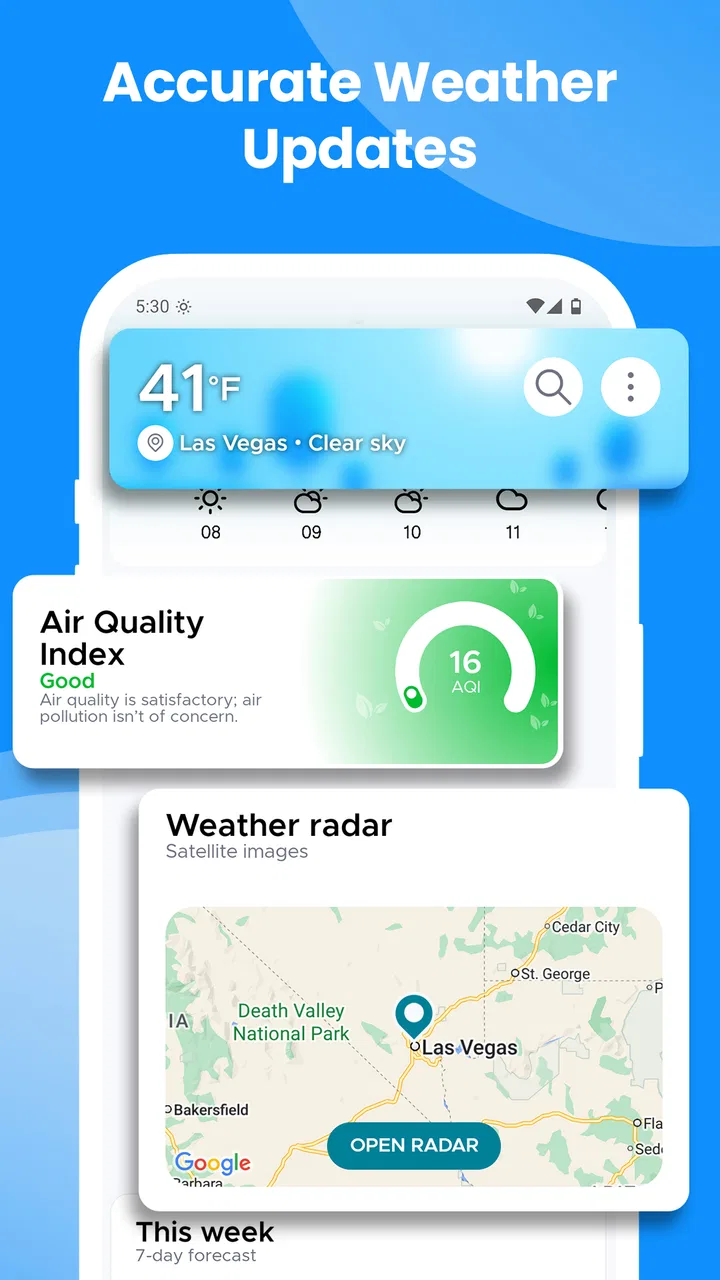
The capability that defines Overdrop for me is its widget-centered approach. Widgets change the role of a weather app: rather than being a destination, it becomes a quiet layer of information on the home screen. That distinction matters when I am deciding whether to carry an umbrella, change a cycling route, dress for a cold evening, or leave earlier because conditions may deteriorate.
The app offers more than seventy widget options, which sounds excessive until I consider how differently people use weather information. I may want a compact temperature display, while someone else may prefer a broader view with hourly conditions. A widget can also be useful when I do not want another notification competing for attention. I simply glance at the phone while checking messages or starting a navigation session.
In my experience, the best result comes from treating the widget as a decision tool rather than decoration. I would place a concise current-condition widget on the first home screen and reserve a larger space for a forecast view on a secondary screen. That arrangement keeps the immediate answer visible without turning the phone into a wall of weather symbols.
The real strength is reducing the number of steps between a forecast and an everyday decision. A conventional weather app may provide the same broad information after I tap, wait, and scroll. Overdrop’s widget approach can make that information available during the moment when I am already looking at the phone for another reason.
What the widget approach changes in everyday use
Widgets are not automatically better just because they are visible. A badly chosen widget can make a home screen crowded, show too much detail, or become easy to ignore. Overdrop gives me enough choice to avoid that problem, but it also means I need to spend a little time deciding what belongs there. The most useful setup is usually not the largest one.
I would start with the information I repeatedly seek: current conditions, the next few hours, and the broader outlook for the day. If I am more concerned with commuting than weekend planning, an hourly-oriented layout is more useful than a large multi-day display. If I travel outdoors, radar access becomes more important than a decorative temperature panel.
This is one of the app’s less obvious trade-offs. Customization can make the experience feel personal, but it can also turn a simple weather check into a small design project. People who enjoy adjusting their home screen will see that as a benefit. People who want the phone to make every choice for them may find the range of options unnecessary.
I also like the idea of separating “quick glance” information from “investigation” information. The widget should answer whether I need a jacket or umbrella. The full app should handle the follow-up: how the conditions may change, whether rain is moving toward my area, and whether the next several hours look different from the current moment.
Using radar instead of trusting a single forecast line
Forecast icons can be too broad for short-term decisions. A rain symbol covering an entire afternoon does not tell me whether a shower is likely in ten minutes or several hours from now. Overdrop’s live radar is valuable because it encourages me to look at movement and timing rather than treating one icon as a complete answer.
A realistic example is a weekday commute. Before leaving work, I might see that the widget shows unsettled conditions later. Rather than immediately changing my plans, I can open the radar and check whether the approaching precipitation appears likely to affect the route soon. That does not eliminate uncertainty, but it gives me a more useful basis for deciding whether to walk, cycle, drive, or wait.
Radar is especially helpful when the forecast and the sky do not seem to agree. A bright icon does not guarantee that a nearby shower will miss me, and cloudy conditions do not necessarily mean rain is imminent. I would use the widget for awareness and radar for confirmation when timing matters.
There is a practical limitation here: radar is most useful when I interpret it as a short-term aid, not as a promise. Weather patterns can change, and a moving map can create a false sense of precision if I stare at it too confidently. Overdrop gives me a better visual tool than a static forecast, but I still need to leave room for local variation.
How I would use Overdrop through a normal day
In the morning, I would use the home-screen widget to answer the quickest questions: what is happening now, how the next few hours look, and whether the temperature trend suggests a change in clothing. This is faster than opening a full forecast page, especially when I am already rushing.
Before leaving, I would open the app only if the situation looked uncertain. The radar becomes the next step when rain timing matters. This two-level workflow is more efficient than opening the full app every time: the widget handles routine checks, while the detailed interface is reserved for decisions that deserve closer attention.
During the afternoon, the same setup can help with plans that were made in the morning but now need revisiting. A forecast that looked comfortable at breakfast may be less useful after several hours. A glance at the updated widget can prompt me to check the radar or adjust the time of an outdoor activity.
In the evening, I would use the broader forecast to plan the next day rather than relying only on the current temperature. This is where a larger widget can earn its space. It can help me notice a changing pattern without requiring a separate habit of opening the app every night.
That workflow is a concrete reason to choose Overdrop over a basic default weather app. The default option may be perfectly adequate for occasional checks, but Overdrop makes weather more visible and more configurable. I am not necessarily receiving a completely different kind of information; I am changing how quickly and naturally I can reach it.
Where the design helps and where it can distract
The visual design is one of the app’s noticeable advantages. Weather information is easier to use when the screen has a clear hierarchy, and Overdrop aims for a more polished presentation than a plain list of temperatures. The design can make routine checks feel pleasant without requiring me to read a dense block of data.
Still, attractive presentation should not replace clarity. When I choose a widget, I would prioritize readable text and a layout that remains understandable at a glance. A visually impressive arrangement is not useful if I need to stop and decode it while standing outside or hurrying to an appointment.
This is also why I would not recommend filling every available home-screen space with weather panels. One carefully selected widget can improve the phone. Several overlapping ones may create noise and make the information less noticeable. Overdrop gives me the tools to build either experience, so the quality of the result depends partly on restraint.
The app is free to start, which lowers the barrier for trying different layouts and deciding whether the widget-based approach fits my habits. It includes in-app purchases ranging from $0.99 to $104.99 per item, so I would look carefully at what any optional purchase changes before paying. The free starting point is useful, but the presence of purchases means I would not assume every customization or advanced option is included without checking the app’s own purchase screen.
What I would check before relying on it
Weather accuracy is always tied to location and timing, so I would first set up the app for the place where I spend most of my day and compare its forecast with what I can observe locally. I would not judge it from one unusual storm or one inaccurate-looking hourly prediction. A weather app earns trust through repeated, useful decisions rather than a single perfect result.
I would also check how often the widget feels current enough for my routine. If I need minute-by-minute awareness, I would open the full app and use radar rather than depending only on the home-screen summary. The widget is best understood as a convenient overview, not a replacement for every detailed weather check.
Another useful habit is to avoid interpreting the temperature alone. Wind, precipitation timing, and the direction of change can matter more than the headline number. Overdrop becomes more valuable when I use its broader presentation and radar to build that fuller picture instead of checking only whether the current temperature is high or low.
The best scenario for this app
Overdrop makes the most sense for someone whose day changes with the weather but who does not want to keep opening a weather app. Commuters, parents planning outdoor activities, casual runners, travelers, and people who spend part of the day outside can all benefit from visible forecast information.
Imagine planning a school pickup on a day with uncertain conditions. A compact widget can show that the morning is calm while the later forecast looks less stable. Before leaving, radar can help determine whether the rain pattern is moving toward the area or simply appearing elsewhere. I would still carry a backup plan, but the app helps me make that plan earlier instead of reacting after the weather changes.
The same approach works for a short bike ride. I can use the widget to see whether the temperature is comfortable, then check the radar for a developing shower before committing to the route. That is more useful than looking at a single daily icon, because the decision depends on timing and movement.
For travelers, the value is slightly different. A customizable widget can keep the destination’s forecast visible while the phone is being used for maps, messages, and reservations. I would still verify the location carefully when moving between places, but having weather information close at hand can reduce the friction of checking conditions in an unfamiliar area.
Important trade-offs compared with simpler alternatives
The obvious alternative is the weather app already installed on a phone. That option usually wins for speed of setup and familiarity. If I only need the current temperature and a basic outlook, the default app may be enough. There is no strong reason to replace a simple tool that already fits my routine.
Overdrop wins when I care about presentation, widgets, and a more deliberate relationship with the forecast. Its large widget selection gives me more control over what appears on the home screen, while live radar offers a better way to investigate short-term precipitation than a static icon.
Another alternative is a radar-focused weather service. That type of app may be preferable for someone whose decisions depend heavily on storm movement or highly detailed precipitation tracking. Overdrop is more balanced: it combines the everyday convenience of widgets with radar access, but I would not choose it solely because I need the most specialized meteorological workflow possible.
There is also a trade-off between flexibility and simplicity. Overdrop’s customization is a genuine advantage only if I am willing to configure it. Someone who dislikes changing layouts may install it, see several choices, and return to a basic forecast tool. I would recommend it to people who want control, not to people who view customization as work.
The app supports Android devices running at least version 6.0, which makes it accessible to a broad range of older Android hardware. Its current version is 2.4.0, and the app has been available since December 25, 2018. Those details suggest an established product rather than a brand-new experiment, although I would still judge the current experience on the device I use.
Who gains the most from the widget and radar combination
The strongest match is a person who checks weather several times a day and wants those checks to be quick. If I regularly decide what to wear, when to commute, or whether to continue an outdoor plan, putting a useful summary on the home screen can save repeated taps and make the forecast part of my normal routine.
It is also a good fit for people who care about how their phone looks. The large widget selection allows the weather display to fit different home-screen styles instead of forcing everyone into one layout. I would see that as a meaningful benefit rather than decoration because the right arrangement determines whether I notice the forecast at all.
Families may find the glanceable information convenient, especially when several people are coordinating outdoor plans. A parent can check the broader outlook, then use radar when a short-term decision becomes important. The app does not remove the need for judgment, but it can make the relevant information easier to reach.
I would be more cautious about recommending it to someone who wants a bare-bones utility, dislikes home-screen widgets, or needs a highly specialized professional weather system. It may also be unnecessary for a person who rarely checks conditions and is satisfied with the phone’s default weather panel.
The rating of 4.2 from around twenty-one thousand ratings, along with more than a million installs, indicates that many Android users have found the concept worthwhile. I treat those figures as context rather than proof that it will suit everyone. The deciding factor is whether visible, customizable weather information improves my own routine.
My recommendation after using it
I recommend Overdrop to anyone who wants weather to be available before they think to open an app. Its most convincing feature is the connection between customizable widgets and live radar: the widget handles quick awareness, while radar helps me make a more informed short-term decision when conditions are uncertain.
I would install it for the widget experience, not simply because it is another forecast app. I would begin with one readable widget, keep the home screen uncluttered, and use the full radar view only when timing matters. That setup captures the app’s practical benefit without turning weather checking into a constant distraction.
For me, the balance is favorable. The free entry point makes experimentation easy, the Everyone content rating keeps it broadly approachable, and the design feels more considered than many default tools. The main friction is that the abundance of choices can require setup, and optional purchases mean I would review the available upgrade carefully before spending money.
In the end, Overdrop is best when weather affects my plans often enough that convenience matters. If I want a simple number and nothing else, the usual default app may be faster. If I want a weather view that stays visible, looks good, and gives me radar when a forecast needs closer inspection, this is the app I would recommend trying first.
FAQs for Overdrop - Weather & Widgets
01What features does Overdrop - Weather & Widgets offer?
Overdrop provides real-time weather updates, a seven-day forecast, and multiple widgets for your home screen. It includes detailed metrics like humidity, UV index, and air pressure. Additionally, the app offers severe weather alerts and radar maps, making it a comprehensive tool for weather tracking.
02Is Overdrop - Weather & Widgets free to use?
Overdrop is free to download and use, but it offers a premium version for users who want an ad-free experience and additional features. The premium version includes more widget styles, exclusive themes, and access to multiple weather providers for enhanced accuracy.
03How accurate is the weather data in Overdrop?
Overdrop sources its data from reliable providers such as Dark Sky and AccuWeather, known for their accuracy. Users can choose their preferred data provider within the app settings, ensuring they receive the most precise forecasts for their location.
04Can I customize the widgets in Overdrop?
Yes, Overdrop allows extensive customization of its widgets. Users can choose from various widget sizes and styles to match their home screen aesthetics. The premium version offers even more themes and customization options, allowing for a personalized weather monitoring experience.
05Does Overdrop support multiple locations?
Overdrop supports tracking weather in multiple locations, making it easy for users to monitor weather conditions in different areas. This feature is especially useful for travelers or those who want to keep an eye on the weather in places where family or friends live.
Pros
- Intuitive interface with sleek design.
- Accurate weather forecasts and alerts.
- Customizable widgets for home screen.
- Minimal battery consumption.
- Detailed hourly weather updates.
Cons
- Limited free features
- premium needed.
- Occasional ads in free version.
- No offline mode for forecasts.
- Some widgets lack customization.
- Data accuracy varies by location.

Overdrop - Weather & Widgets
Gallery